Sonos and Spotify
Rooms, volume, grouping, favourites, the TV input and a sleep timer. Spotify plays anything on any speaker it can reach, Sonos rooms included, and can tell you what that song was.
Open source · MIT licence
A round puck for the kitchen bench. Tap it and ask: it answers out loud, and it runs the house. The music, the TV, the lamps, the heating, even the PC. Build one yourself: the puck, the hub and its plugins are all on GitHub.
A day on the bench: one shot, from first light to lights out. With sound, and captions.
A day on the bench
The film is one shot of one day. Nothing in the card house has any colour until it does something: yellow for music, blue-white for screens, a warm lamp, terracotta for the heating. Here is the day again, a moment at a time, with what was on the puck’s screen.
First light
What's the weather doing this afternoon?
Clearing by two. Take a jacket till then.
Tap it and ask. It listens while you talk, notices when you stop, and answers out loud on its own speaker, with the web to hand when a question needs it. Nothing in the house has to be connected for that.
In the houseNothing happens in the house. It is still white, and the sun has just reached the bench.

Morning
Play some jazz in the kitchen.
Jazz, in the kitchen.
Every puck has a room, so music from the kitchen puck means the kitchen speaker. Then turn the puck itself, the whole of it, and the music turns up with it.
In the houseThe kitchen lights up yellow and notes rise from its speaker. When the puck is turned they grow, and so does the music.


Midday
Group the kitchen with the ensuite.
Done. Both rooms.
Sonos rooms can be grouped, moved and turned down by name, and Spotify plays anything on any speaker it can reach. The Home face shows what is playing in the puck's room: tap to pause, swipe for the next track.
In the houseThe ensuite upstairs lights yellow as well, and the music plays in both.


Afternoon
Set a timer for pasta. Ten minutes.
Ten minutes. Starting now.
Your pasta's ready.
Timers, alarms and reminders, said out loud and counted down on the puck that set them. When one is done it chimes and says so, and the banner stays until you have seen it.
In the houseThe camera comes down to the puck and the real pot. By the time the pasta is ready, the television and the study’s screen have come on.


Sunset
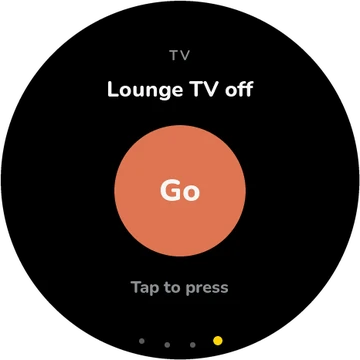
Turn off the downstairs TV.
It's off.
Lamp on.
Televisions, smart plugs and relays, and anything Home Assistant runs: on, off, or the input changed. The Controls face keeps the ones you use most a swipe away, as dials and buttons.
In the houseThe lounge’s blue goes out. After the sun has gone, a warm lamp comes on in its place.


Night
Turn the heating up half a degree.
Twenty-one and a half.
The heating too: up or down by half a degree, or one room at a time, through Home Assistant or a heating controller that has its own web API.
In the houseTerracotta spreads under every floor, a room at a time.


Night
Shut down the PC.
Shut down the PC? Turn for yes.
Anything drastic waits for a yes on the puck itself: turn it to Yes, then tap. The Windows PC is one more thing it can run, from its volume and headphones to its apps and its power.
In the houseThe puck is turned, and tapped. The study’s screen goes dark.


Lights out
Everything off. Good night.
Good night.
One sentence for the whole house. The music stops and the rooms go out. The heating stays on, because nobody asked for that.
In the houseThe rooms go out one by one, and the music with them. Only the warm floors are left.

How it works
The puck has a touch screen, but you hardly need it. The whole puck is the button, and the whole puck is the dial.

It listens until you stop, and shows your words as you say them. Talk over it to interrupt; after an answer it waits a moment for your reply.
Turn the puck itself: the volume while it talks or plays, Yes or No when it asks, minutes on a new timer.

Home shows what is playing. Controls has the dials and switches you use most. The side button picks a face; hold it to switch off.

Turn to set the minutes, tap to start. Timers set on the puck work with no hub at all.
What it runs
Everything the puck can do comes from plugins on the hub. These come with it, and each card says where it does its work.
Rooms, volume, grouping, favourites, the TV input and a sleep timer. Spotify plays anything on any speaker it can reach, Sonos rooms included, and can tell you what that song was.
Samsung, LG and Roku: off, on, louder, quieter, another input. Each one is paired once, from the hub’s page.
Shelly relays, TP-Link Kasa and Tapo plugs, or any address that switches something on: the lamp, the fan, the kettle.
Anything Home Assistant already runs, its scenes and scripts included, and a way to ask it whatever the other plugins do not cover.
The house’s setpoint, or one room at a time, by half a degree, through Home Assistant or a heating controller with its own web API.
The forecast where you live, timers, alarms and reminders, the shopping list, and things to remember: “the bins go out on Tuesday nights”.
Its volume and its headphones, what is playing, its apps and files, what is on its screen, and lock, sleep or shut down, after it asks.
Custom actions that call a webhook or run a script without code, the tools of any MCP server, or a plugin of your own: a C# class with a few marked methods.
Where it thinks
The puck listens, speaks and shows. The thinking happens on a hub at home, which asks Claude what you meant and then does it, on your own network.
On the bench
Microphones, a speaker, a round screen. Joins your Wi‑Fi and finds the hub by itself.
On a NAS, or the PC
Runs around the clock in Docker, or as a small app in the PC’s tray. Finds the speakers, TVs and plugs.
In the cloud
Works out what you asked for and which tools will do it, and searches the web when it needs to.
If the hub is off, the puck still answers questions on its own, talking to Claude directly. The house waits until the hub is back.
Hearing can run on the hub itself, or through a speech service. Answers come in the voice you pick; the puck’s own is Annette, an Australian voice.
A new puck opens its own Wi‑Fi network and shows a QR code. Give it yours, then approve it on the hub’s page with the three digits on its screen.
Each puck has a name and a room, so “turn it down a bit” from the kitchen means the kitchen.
Build your own
Everything Pucksley is, is on GitHub. A puck is a Waveshare board flashed with its firmware; the hub runs in Docker or on a Windows PC; Claude needs your Anthropic API key.
A Waveshare ESP32-S3-Touch-AMOLED-1.75C: the round screen, the microphones, the speaker and the battery, all on one board.
On a NAS or a Linux box in Docker, or as a tray app on a Windows PC. Its page opens at port 8765.
docker compose \n -f hub/docker-compose.yml \n up -d --buildWith ESP-IDF 5.5, over USB.
cd firmware
idf.py set-target esp32s3
idf.py -p COM5 flashThe puck opens its own Wi‑Fi network and shows a QR code. Give it yours, approve it on the hub’s page, and add your Anthropic key.
Questions
Yes. The puck’s firmware, the hub and every plugin are on GitHub under the MIT licence, and so is this website. Build one, change it, and send what you make back if you like.
Not ready-made, yet. You can build one today: the puck is a Waveshare ESP32-S3 board with a round AMOLED screen, flashed with Pucksley’s firmware. We would like to make a ready-made one; leave your email at the bottom of this page and we will write once if we do.
The software is free. Claude is paid for as you use it, with your own Anthropic API key. Cloud speech services charge for use too, unless you run Whisper and Piper on the hub instead.
No. It listens when you tap it or pick it up, and stops when you stop talking. After an answer it listens for a few seconds in case you reply, and then goes quiet by itself.
To run the house it needs a hub at home: a NAS or other x86-64 machine that runs Docker, or a Windows PC with the Pucksley app in its tray. With no hub it still answers questions, on its own, over Wi‑Fi.
Claude, made by Anthropic, with your own API key. The hub gives it the tools for your house, and it searches the web when a question needs it.
After a tap, what you say goes to your hub. It is turned into words there, by Whisper on the hub itself, or by the speech service you choose, and the words go to Claude. The answer is spoken by the voice you choose. The speakers, TVs and plugs are run on your own network.
The Waveshare ESP32-S3-Touch-AMOLED-1.75C: a round 1.75-inch touch screen, microphones, a speaker, a motion sensor that knows when it is turned or picked up, a side button and a battery. A case of its own is still being designed: the puck in the film is a render.
Yes. Custom actions call a webhook or run a script with no code at all, any MCP server’s tools become Pucksley’s, and a plugin is a C# class with a few marked methods, dropped into the hub’s plugins folder.
Build one and tell us what broke. Issues and pull requests are welcome on GitHub, for the puck, the hub and its plugins, and for this website.
The house, the bench and the puck are computer-made, and the voices are computer voices. What is on the puck’s screen is its real faces. Every request in the film is one the hub handles today, and we are checking each one on a real puck, in a real house.
We would like to make a finished puck, case and all. Leave your email and we will write once, if we do.
We will write once, if there is a ready-made puck.